
Two extremes many mid-sized companies know
Ask a typical mid-sized company about its software and you'll usually hear one of two stories:
| Path | What's good | Where it hurts |
|---|---|---|
| Patchwork of many individual tools | Each tool solves one problem well, quick start | Data is maintained twice, nothing talks to anything else, errors creep in, licenses add up, the rest is handled by Excel and paper notes |
| Large off-the-shelf system such as SAP | Covers a lot, proven in large corporations | Expensive licenses, rollout and customization, needs consultants, and your processes are bent to fit the system instead of the other way round |
Often it is both: Excel lists and add-on tools grow around the large system. The result is usually the same. Your team carries data from A to B, customers wait for quotes because the information sits in three systems, and new ideas run into the question of whether the software can even do it.
What we mean by AI software
The term is used for many things. Here it means two different things that often come together:
- Built with AI: custom software that is built with the help of AI. The features themselves are classic, such as a customer portal or order management. The difference is in how it's built.
- AI inside: software in which AI takes on a task that used to require reading, classifying or writing, for example reading a delivery note or drafting a quote.
Not every custom software needs AI inside. Often the first win is simply having data in one place. AI features are added where they take over a concrete task.
Why the third path is more realistic today
Custom software development was long seen as a luxury for large corporations: expensive, slow and risky. AI changes two things.
Development gets faster. With AI-assisted development, interfaces, data models and integrations come together faster than before. Above all, you get something to touch early on: a prototype your team can try out, instead of a requirements document nobody enjoys reading. You find out early whether the direction is right, before much budget is committed. That doesn't automatically make the overall project cheaper: clarifying requirements, testing, data migration and operation still take time and money.
The software itself can do more. It reads delivery notes, invoices and emails, sorts requests or prepares replies and quotes. A person checks the result: thoroughly at first, then by spot checks once the AI has proven reliable. How well this works depends heavily on the quality of your data and documents.
There's also a practical reason: if you still run the older SAP ERP (ECC), you have to move anyway, because mainstream maintenance ends at the end of 2027 (see ComputerWeekly). Before you start a big migration project, it's worth asking which parts of your business really need large enterprise software and which would be better served by a lean solution of your own. The best SAP alternative is often not another large system, but a combination: standard software for the basics, custom software for what sets you apart.
When it pays off to have custom software developed
Custom software pays off especially when
- a process is central to your business and sets you apart from competitors,
- standard solutions can only handle this process with lots of workarounds,
- many people work with it every day, internally or on the customer side,
- you want to steer its development yourself.
It usually doesn't pay off for tasks that work the same in almost every company, such as accounting, payroll or email. There's good standard software for these, and your own solution exchanges data with it via interfaces. How to decide area by area is covered in our decision guide Custom software or off-the-shelf.
What custom software looks like in a mid-sized company

This isn't about rebuilding your own SAP, but about the processes that earn you money. Typical building blocks, each with the point where AI can help:
| Building block | What it solves | Where AI helps |
|---|---|---|
| Customer portal | Customers order, see the status and download documents themselves | Answering or pre-sorting customer questions |
| Quotes and estimates | Requests no longer land in three inboxes | Reading the request, suggesting line items, drafting the quote |
| Order processing | From intake to invoice in one interface | Reading receipts and delivery notes |
| Internal platform | HR, equipment, documents and projects under one login | Checking and summarizing documents |
| Reporting | Figures from all areas in one place | Spotting and explaining anomalies |
These building blocks grow step by step. You start with the process that hurts most today and expand once the first part works in everyday use.
The upgrade: bring AI into the software you already have

Not every company needs new software. Often the existing system is good at its core, but too much around it is still done by hand. Then it's better to build on what's there and integrate AI into your existing software, in three stages:
- Digitize: whatever runs on paper, by phone or in personal Excel lists today moves into a system, for example a form instead of a phone call.
- Automate: recurring steps run without clicking, such as transferring data between two programs or sending reminders.
- Add AI on top: the AI takes on tasks that used to require judgment, such as classifying requests, checking documents or suggesting replies. How this works with autonomous assistants is covered in our guide to AI agents in business.
The prerequisite is that your existing software lets data out, via interfaces or at least exports. That can be clarified quickly at the start.
Good to know: the analysis of which processes can be digitized and automated and where AI has the biggest impact counts as consulting and can be funded. uberneu is registered with BAFA as a consulting firm. Through the program Funding of business consulting for SMEs, companies based in Germany get up to 80 percent of the consulting costs reimbursed. How it works is explained in What does AI integration cost?
What's in it for you
When custom software or an upgrade is done well, you notice it in a few places:
- Less duplicate work: data is maintained once, not in three programs.
- More time for customers: when routine work disappears, there's time for advice, sales and service.
- Customers who stay: your own portal or faster quotes make it more convenient for customers to stay with you.
- Acceptance in the team: software developed together with the people who use it fits everyday work better and is more likely to be used.
What does it cost?
A serious figure is only possible once it's clear which process with which integrations is to be covered. Effort is driven mainly by the number of processes, user roles and integrations, the quality of existing data and the share of AI features.
Don't just compare the entry price, compare total costs over several years. Both sides include:
| Item | Custom software | Standard software |
|---|---|---|
| Start | Concept, development, data migration | Setup, customization, data migration |
| Operation | Hosting, monitoring, backups | Per-user licenses, add-on modules |
| Maintenance | Security updates, keeping integrations working | Price increases, consultant hours for customization |
| AI | Usage costs of AI models, depending on volume | Surcharges for AI features, if offered |
| Further development | New features based on your priorities | According to the vendor's plan |
| Hidden | Dependency if documentation is missing | Working time for workarounds and duplicate data entry |
We prefer fixed prices for clearly defined packages, for example a first usable version of one process, or an ongoing partnership. What a package includes is put in writing before the start.
How dependent do you remain? Make sure you get the usage rights to the source code, have access to the repository, and that the software is documented and uses common technologies. Then another team can develop it further. The full checklist is in our decision guide.
Common mistakes
- Wanting everything at once. If you try to map the whole company in one project, you end up with a big project again. Start with one process.
- Building without the people who'll use it. Dispatch, sales or the workshop know best where things get stuck.
- AI for its own sake. AI pays off where it takes over a concrete task, not as a buzzword in the requirements.
- Forgetting existing systems. Without interfaces to accounting or the ERP, you just create another piece of patchwork.
- Not clarifying maintenance. Your own software also needs updates, security and someone to develop it further.
- Thinking about data protection too late. Which data the AI may see and where it's processed belongs at the start. More in AI and data protection.
Checklist: is a closer look worth it?
- Your team maintains the same data in several programs or Excel lists.
- You use many individual tools that aren't connected.
- A process that is central to you doesn't fit into your existing standard software.
- Customers regularly ask about status, documents or quotes.
- License costs or customization of your existing software rise every year.
- There are recurring tasks with documents, emails or requests that an AI could prepare.
A single point can be enough if it affects a process that revenue or customer satisfaction depends on. Companies in Germany can also get free, vendor-neutral support for digital transformation from the Mittelstand-Digital centers.
A real-world example: KBH Hub
Before: the construction company KBH Haus worked with a patchwork of individual tools. Nothing talked to anything else, data was maintained several times over, which was error-prone, and the licenses for all those tools were expensive.
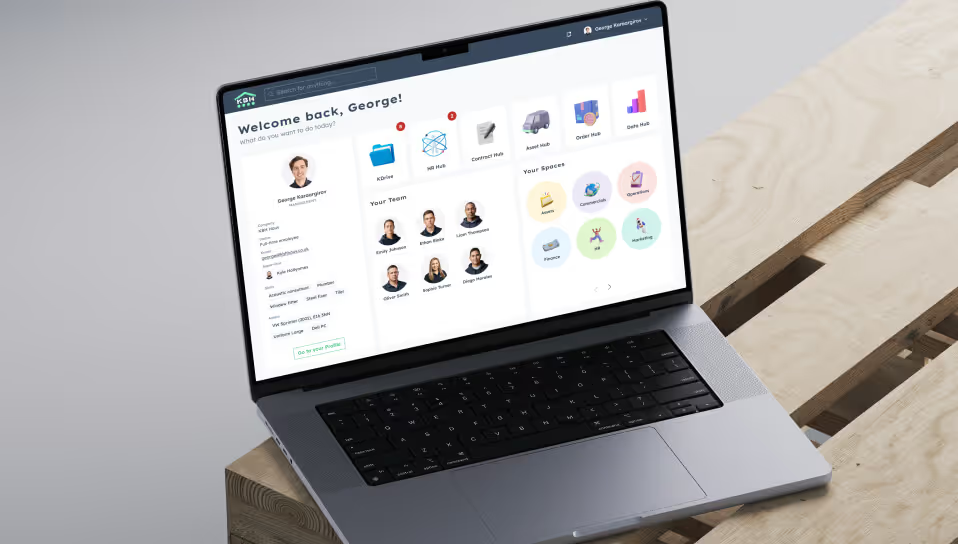
What was built: the KBH Hub, a modular platform that brings the previous individual tools together under one interface. Employees and customers have a single login and see the areas that match their role. In the HR Hub, the HR team checks during onboarding whether all documents are in place and obtains consent to legal documents with one click. Other areas manage equipment, assign teams to projects and contracts, and store documents with version control.
After: the data lives in one place instead of being copied between tools, and many individual licenses are replaced by a platform of the company's own that grows with it, area by area.